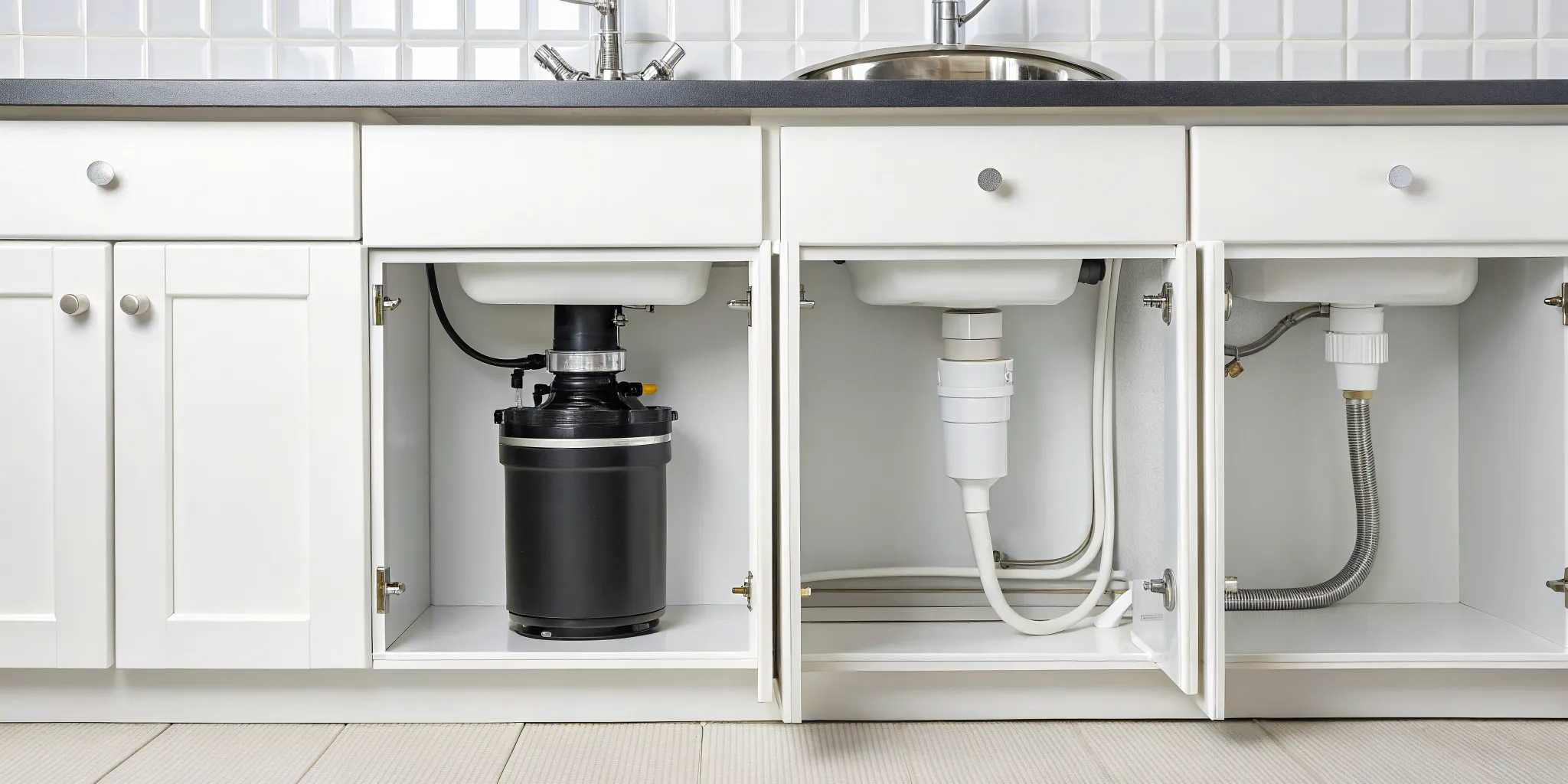
A non-working garbage disposal can bring your kitchen cleanup to a grinding halt. While your first instinct might be to call for professional help, you can often solve the problem yourself in just a few minutes. The secret lies in a small feature most homeowners don't know about until they need it. Learning how to find and use the garbage disposal reset button is an essential DIY skill that can save you time, money, and a lot of frustration. This guide will empower you with the knowledge to safely troubleshoot your disposal, clear common jams, and know when it’s the right time to call for backup.
Key Takeaways
- Check the Reset Button First: Before you panic, look for a small red or black button on the bottom of the disposal unit. This is a safety feature that trips to prevent motor damage, and simply pressing it is often the only fix you need.
- Clear Jams Safely: If you hear a hum but the blades aren't spinning, you likely have a jam. Always turn off the power at the circuit breaker, then use a hex wrench and tongs to dislodge the blockage, never your hands.
- Recognize When to Call a Plumber: If the reset button keeps tripping, you see leaks, or hear loud grinding noises, it's time to stop troubleshooting. These are signs of a deeper issue that requires a professional to diagnose and fix correctly.
What Is a Garbage Disposal Reset Button?
If your garbage disposal suddenly stops working, don't panic just yet. Before you assume the worst, it’s worth checking for a small but mighty feature: the reset button. Think of this button as a mini circuit breaker designed specifically to protect your disposal's motor. When the unit overheats or gets jammed, the button pops out, cutting off the power to prevent the motor from burning out. It’s a simple safety mechanism that can save you from a costly replacement.
Most of the time, a quick press of this button is all you need to get your disposal running again. It’s the appliance's way of telling you it was working too hard and needed a break. Understanding why it trips is the key to preventing future issues and keeping your kitchen sink in working order. Before you start troubleshooting, let's get familiar with what this button does and why it might have been triggered.
How It Protects Your Disposal
The reset button is your garbage disposal's first line of defense against damage. Its job is to monitor the motor for signs of strain. If the disposal gets too hot from running for an extended period or tries to grind something too tough, the button automatically trips and shuts off the power. This interruption stops the motor from overheating and sustaining permanent damage. Without this feature, a simple jam could easily burn out the motor, forcing you to replace the entire unit. So, if you find the button has popped, it’s actually a good sign that the safety system is doing its job correctly.
Common Reasons It Trips
A tripped reset button usually points to one of a few common issues. The most frequent cause is a jam. If you put something down the drain that the blades can't process, like fibrous vegetables, bones, or a stray utensil, the motor will struggle and overheat. Overloading the disposal with too much food at once can have the same effect. Another reason is running the unit for too long without cold water, which helps keep the motor cool during operation. In any of these cases, the reset button trips to prevent the motor from continuing to strain against the blockage or high temperature.
When a Reset Signals a Bigger Problem
While a one-off reset is normal, a button that repeatedly trips is a red flag. If you reset the disposal and it immediately pops out again, or if it trips every time you use it, there’s likely an underlying issue. It could be a persistent clog you can't see, an electrical problem, or a sign that the motor is failing. If you’ve cleared any visible jams and allowed the unit to cool down but the problem continues, it’s time to stop pressing the button. Continuing to reset it can cause more damage. At this point, your best bet is to get a professional opinion from a qualified plumber.
How to Find the Reset Button on Your Garbage Disposal
So, you've figured out your garbage disposal likely needs a reset. The next step is finding that little button. This can sometimes feel like a treasure hunt, especially with a cabinet full of cleaning supplies in the way. But don't worry, it's almost always in the same general area. Once you know what you're looking for, you'll be able to spot it in seconds.
The reset button is a safety feature, and manufacturers want it to be accessible, even if it's a bit hidden. Before you start poking around, it's a good idea to grab a flashlight. The area under the sink is usually pretty dark, and a little extra light makes all the difference. Let's walk through exactly where to look and what to do if it's playing hide-and-seek.
What the Button Looks Like
The reset button is almost always a small, physical button located on the garbage disposal unit itself. Look for a small red or black button, typically on the very bottom of the main housing. You'll probably need to get low and look up at the underside of the disposal to see it.
When the disposal's motor overheats or gets jammed, this button will pop out, extending about a quarter of an inch. If you run your fingers along the bottom of the unit and feel a button that isn't flush with the surface, that's your culprit. It's designed to be obvious when tripped, so you'll know it's the right one.
Can't Find It? Here's What to Do
If you've cleared out the space under your sink and still can't spot the button, don't get discouraged. While most are on the bottom, some models place it on the side near the bottom. Use your flashlight to slowly scan the entire metal canister. Sometimes, years of kitchen grime can camouflage it, so you might need to wipe the unit down.
In most cases, a non-working garbage disposal is fixed with a simple push of this button. If you've looked everywhere and are certain your model doesn't have an external reset button (which is very rare), or if you're just not comfortable contorting yourself under the sink, it might be time to call for backup. Our team is always ready to help with any plumbing services you might need.
A Quick Safety Check Before You Begin
Before you roll up your sleeves and get to work, let's talk about safety. I know you're eager to get your kitchen sink back in working order, but taking a few moments to prepare can prevent a serious accident. These steps are non-negotiable, so please don't skip them. Your safety is always the top priority. Working with any appliance that combines electricity, water, and sharp blades requires your full attention and a few key precautions. It's easy to underestimate the potential for injury when you're focused on fixing what seems like a simple jam, but a little caution goes a long way.
Think of this as your pre-flight check before you solve the problem. It only takes a minute and ensures you can handle the issue without any unexpected and painful surprises. Getting this right from the start will give you the confidence to tackle the reset process correctly. If at any point you feel unsure or the problem seems more complicated than a simple reset, remember that our team of plumbing professionals is always here to help. There's no shame in calling for backup when dealing with tricky plumbing issues, and it's always better to be safe than sorry.
Cut the Power (Seriously)
Okay, I can't stress this enough: you must cut all power to the garbage disposal before you do anything else. This isn't just about flipping the wall switch above your counter. While that's a good first step, you also need to go to your home's electrical panel and turn off the circuit breaker that controls the disposal. This double-checks that no electricity can reach the unit, preventing it from accidentally turning on while you're working. It might seem like a hassle to walk to the breaker box, but it’s the only way to be absolutely certain the appliance is safe to handle.
Keep Your Hands Out of the Disposal
This next rule is just as important: never, ever put your hands inside the garbage disposal's grinding chamber. Even with the power off, the blades are sharp. If you suspect something is stuck in there, grab a pair of pliers or tongs to investigate and pull out any debris. A flashlight will also be your best friend here, helping you see what you're dealing with. Whether it's a stray spoon, a fruit pit, or a bottle cap, using a tool to retrieve it is the only safe way. This simple practice protects your fingers from nasty cuts and ensures you can clear a jam without a trip to the emergency room.
How to Reset Your Garbage Disposal in 6 Steps
When your garbage disposal suddenly stops working, it’s easy to assume the worst. But more often than not, the fix is surprisingly simple. Most disposals have a built-in overload protection feature that automatically shuts off the motor to prevent it from overheating or burning out. This is usually triggered by a jam or running the unit for too long. Resetting it is a straightforward process that you can likely handle yourself in just a few minutes.
Think of the reset button as your disposal's own little circuit breaker. Before you call for backup, let's walk through the six simple steps to get your sink back in working order. Following these instructions carefully will help you safely diagnose and solve the problem. If these steps don't work, it might signal a more complex issue, and our team of plumbing professionals is always here to help.
Step 1: Turn Off the Power
Before you do anything else, your absolute first step is to cut all power to the garbage disposal. This isn't just a suggestion; it's a critical safety measure. Start by flipping the wall switch connected to the disposal to the "Off" position. For complete safety, you should also go to your home's main electrical panel and turn off the circuit breaker that powers the unit. This double-checks that no electricity can reach the disposal while you're working on it, protecting you from shock and preventing the unit from accidentally turning on.
Step 2: Clear Your Workspace
Now that the power is off, take a moment to clear the area under your sink. This space can get crowded with cleaning supplies, trash cans, and other items. Move everything out of the way so you have a clear, unobstructed view of the garbage disposal and plenty of room to work. This will make it much easier to find the reset button and use any tools if needed. Having a clean workspace also reduces the risk of knocking something over or creating a bigger mess while you focus on the task at hand.
Step 3: Find the Reset Button
With your workspace clear, it's time to locate the reset button. You'll find it on the disposal unit itself, usually on the bottom or lower side. Grab a flashlight to get a good look, as it can be dark under the sink. The button is typically small, red, and protrudes from the surface of the unit. On some models, it might be black or another color, but it will almost always be the only button of its kind. If you're having trouble, you can often find diagrams in your disposal's user manual or by searching for your specific model online.
Step 4: Press the Button
Once you've found the reset button, press it firmly. You should feel or hear a distinct click, which indicates that the internal circuit has been reset. If the button doesn't stay in, don't force it. According to home repair experts at The Spruce, this usually means the motor is still too hot and needs to cool down. Forcing it could cause damage. Simply let it be for a little while before you try again. A button that pops back out immediately can also be a sign of a jam, which we'll cover later.
Step 5: Give It a Minute to Cool Down
Patience is key here, especially if the reset button didn't stay in on the first try. An overheated motor needs time to cool before it can be reset successfully. Wait about 10 to 15 minutes to give the unit a chance to return to a safe operating temperature. This cooling-off period is essential for the internal thermal overload switch to reset properly. After waiting, try pressing the button again. If it clicks and stays in this time, you're ready to move on to the final step.
Step 6: Test Your Work
It's the moment of truth. First, head back to your electrical panel and flip the circuit breaker back on. Then, turn on a steady stream of cold water into the sink. The running water helps lubricate the blades and flush out any small food particles that may have caused the initial issue. Finally, flip the wall switch for the disposal. If it roars back to life, congratulations, you've fixed it! If it still doesn't work or just hums, you may have a jam or another problem that needs a closer look. If you're not comfortable proceeding, it's time to contact a professional.
Is Your Disposal Jammed?
So, you’ve tried hitting the reset button, but your garbage disposal is still on strike. Before you press it again, let’s figure out if a jam is the real problem. When the reset button keeps tripping or won’t stay in, it’s often the disposal’s way of telling you something is physically stuck inside. A jam prevents the blades from spinning, which can cause the motor to overheat and trip the reset button as a safety measure. It's a built-in defense mechanism to prevent the motor from burning itself out.
Think of it like this: the motor is trying to do its job, but a stubborn piece of food or a stray object is holding it back. The motor strains against the blockage, gets hot, and the reset button pops to cut the power and prevent permanent damage. So, if you're stuck in a cycle of resetting the disposal only for it to stop working again, a jam is the most likely culprit. Identifying the specific signs of a jam is the first step to getting your sink back in working order. If you suspect a jam but aren't comfortable dealing with it yourself, our team can handle all types of plumbing services safely and efficiently.
Signs of a Jam
You don’t need to be a plumber to spot a jammed disposal. The most obvious sign is a low humming sound when you flip the switch, but the blades don’t move. The motor is trying to work, but something is blocking it. Another clear indicator is a reset button that pops out immediately after you press it in. This means the obstruction is still there, and the motor can’t run without risking damage. If you notice either of these signs, you can be pretty sure you’re dealing with a jam.
You Hear a Hum, But No Spin
That distinct humming noise is your garbage disposal’s cry for help. When you hear a hum but see no action, it means electricity is reaching the motor, but the blades are stuck. This is a classic symptom of a jam. It could be caused by something hard, like a fruit pit or a small bone, or even just a buildup of fibrous food waste like celery stalks or potato peels. The motor will continue to try to turn the blades, but it can’t, which generates the humming sound and can lead to overheating if left on.
The Reset Button Won't Stay In
It’s frustrating when the reset button refuses to cooperate. If it won't stay pressed in, there are two likely reasons. First, the motor might still be too hot from its previous attempts to run. Give it a solid 10 to 15 minutes to cool down completely before you try pressing the button again. If you’ve given it time to cool and the button still pops right back out, the jam is almost certainly still there. The reset button is doing its job by preventing the motor from burning out, and it won’t stay engaged until the obstruction is cleared.
How to Clear a Jammed Garbage Disposal
If your reset button keeps tripping or you hear a low hum when you flip the switch, you’re likely dealing with a jam. Something is physically blocking the blades from spinning. Don't worry, this is a common issue, and you can often fix it yourself with a few simple tools. Before you start, remember the golden rule: make sure the power to the disposal is completely off at the switch and the circuit breaker.
Use a Hex Wrench to Free the Blades
Most garbage disposals have a small, hex-shaped hole right in the center of the bottom of the unit. This is your secret weapon for clearing a jam. Your disposal might have come with a special wrench for this, but if not, a standard 1/4-inch Allen wrench (or hex key) will do the trick.
Insert the wrench into the hole and turn it back and forth. You’ll need to use a bit of force. This motion manually moves the blades, which can dislodge whatever is stuck inside. Keep working the wrench back and forth until you can feel it move freely in a complete circle. This tells you the jam has been broken up.
Safely Remove Debris with Tongs
After using the wrench, or if you suspect a larger object is the culprit, it’s time to investigate from the top. Grab a flashlight and shine it down into the sink drain to see what you’re dealing with. The most important thing to remember is to never, ever put your hands inside the disposal.
Instead, use a pair of pliers or kitchen tongs to reach in and carefully pull out any obstructions. You might find things like a dropped piece of silverware, a fruit pit, or a small bone. If you can't get a good grip on the object or feel uncomfortable with this step, it's a good sign that it's time to call for professional plumbing services.
Reset the Disposal After Clearing the Jam
Once you’ve successfully cleared the obstruction, you’re ready to get things running again. Go back underneath the sink and firmly press the reset button until it clicks and stays in. If it pops back out, the motor might still be a little warm, so just give it about 10 minutes to cool down before trying again.
After the button is set, turn the power back on at the breaker. Go to the sink, run some cold water, and then turn on the garbage disposal. If you’ve cleared the jam successfully, it should spin up without any trouble. Hearing that whirring sound is a great feeling.
What If the Reset Button Won't Stay In?
You've found the reset button, you've pressed it, but it just won't stay in. It’s a frustrating spot to be in, but it’s usually a sign that your disposal is trying to tell you something. Before you assume the worst, let's walk through the three most common reasons this happens. Most of the time, it's a straightforward issue you can solve in a few minutes. We'll look at whether your unit is still too hot, if there's a hidden jam, or if it might be a sign of a deeper motor issue. This simple check can save you a lot of guesswork and help you figure out your next steps.
It's Still Overheated
If the reset button pops right back out the second you press it, your disposal is likely still overheated. The internal circuit breaker is doing its job, protecting the motor from burning out. The best (and only) solution here is patience. Turn off the disposal switch and give it a break. Walk away for about 10 to 15 minutes to let the motor cool down completely. After it has had time to rest, try pressing the reset button again. If frequent overheating becomes a pattern, it could point to an electrical issue or a worn-out motor that needs a professional eye.
There's a Stubborn Jam
A reset button that refuses to stay put is also a classic sign of a jam. If something is blocking the blades, the motor can't turn, and the reset button won't engage. First, make sure the power to the disposal is completely off at the circuit breaker. Then, find the small, hex-shaped opening on the bottom of the unit. Insert the Allen wrench that came with your disposal (or any standard 1/4-inch one) and turn it back and forth. This manual rotation should be enough to dislodge whatever is stuck in there. Once you feel the blades move freely, you can try resetting the unit again.
The Motor Might Be Damaged
So, you've let it cool down and you've checked for jams, but the reset button still trips every time you press it. This, unfortunately, can be a sign of a more serious problem, like a failing motor. After years of grinding away, the internal components can simply wear out. If the motor is damaged or has seized, it will keep tripping the overload protector as a safety measure. At this point, you've done all the troubleshooting you can. It’s time to stop fighting with the reset button and get a professional diagnosis from a qualified plumber.
Still Not Working? Try These Fixes
So, you’ve pressed the reset button, and… nothing. It’s frustrating when the simple fix doesn’t work, but don’t throw in the towel just yet. Before you decide it’s time for a replacement, there are a few more things you can check. Sometimes, the issue is a simple oversight or a related problem that’s easy to miss. Think of this as your final DIY checklist. Walking through these steps can help you pinpoint the real culprit or confirm that it’s time to call in a professional for a closer look. Let’s go through a few common scenarios to see if we can get your kitchen sink back in working order.
Double-Check the Power
It might sound obvious, but let's start with the basics. Go back to your home's electrical panel and check the circuit breaker connected to your garbage disposal. Did it trip again after you reset it? If it trips immediately every time you turn on the disposal, that could signal a more serious electrical issue or a seized motor. Next, revisit the reset button on the unit. Make sure you gave it a firm, solid push. You should hear or feel a distinct "click" when it engages. If the button won't stay in, the motor might still be too hot. Give it another 10 to 15 minutes to cool down completely before trying again.
Look for Clogged Drains
If your garbage disposal keeps tripping, the problem might not be the unit itself but the drainpipe it’s connected to. A significant clog downstream can prevent water from draining, causing it to back up into the disposal. This puts extra strain on the motor when you run it, which can cause it to overload and trip the reset button. If you suspect a clog, you can try pouring boiling water down the drain to dissolve any grease buildup. However, avoid using harsh chemical drain cleaners, as they can damage your pipes and the disposal's components. If the drain remains slow or completely blocked, it’s a sign you need professional plumbing help to clear the line safely.
Listen for Clues
Your ears can be one of your best diagnostic tools. Pay close attention to the sounds your disposal makes, or doesn't make, when you flip the switch. If you hear a low humming or buzzing, the motor is getting power but the blades are stuck, indicating a jam. No sound at all could mean it’s a power issue, a faulty switch, or a completely failed motor. A loud, metallic grinding noise is a red flag that a foreign object, like a piece of silverware or a bottle cap, might be rattling around inside. The reset button is designed to trip to prevent the motor from burning out against a clog or jam, so listening for these clues can tell you a lot about what’s really going on.
How to Keep Your Garbage Disposal Healthy
A little preventative care goes a long way in keeping your garbage disposal running smoothly. Think of it like any other appliance in your home; it needs some attention to perform its best and avoid frustrating jams or breakdowns. By being mindful of what you put down the drain and performing some simple cleaning routines, you can extend the life of your disposal and keep your kitchen sink smelling fresh. These habits are easy to adopt and can save you from the headache of a sudden clog or the expense of a plumbing repair.
What Not to Put Down Your Disposal
Your garbage disposal is tough, but it’s not invincible. To prevent clogs and keep the blades sharp, avoid sending certain things down the drain. Fibrous and stringy foods like celery, corn husks, and onion skins can wrap around the blades and cause a jam. Starchy items like potato peels, rice, and pasta expand with water and can create a thick paste that clogs your pipes. Other items to keep out include coffee grounds, eggshells, bones, and any kind of grease or oil. Grease solidifies in the pipes, creating stubborn blockages that can affect your entire plumbing system. When in doubt, it's always safer to toss it in the trash or compost bin.
Easy Cleaning Tips
Keeping your disposal clean doesn't require harsh chemicals. A simple and effective method is to use baking soda and vinegar. Just pour about half a cup of baking soda into the disposal, followed by a cup of white vinegar. Let the mixture fizz and work its magic for about 10 to 15 minutes, then flush it all down with hot water. For a quick freshen-up and to help sharpen the blades, toss a few ice cubes and some citrus peels (like lemon or orange rinds) into the disposal and run it with cold water. This not only helps scrub the inside of the unit but also leaves your sink smelling clean and fresh.
How to Prevent Jams and Overheating
The best way to deal with jams is to prevent them from happening in the first place. Always run a strong flow of cold water before, during, and for about 15 seconds after using the disposal. The cold water helps keep grease solidified so it can be chopped up and washed away, rather than sticking to your pipes. Also, be sure to cut large food scraps into smaller, more manageable pieces before putting them in. If you notice the reset button tripping frequently, it could be a sign that the motor is overheating from working too hard. Let the unit cool down completely before trying to reset it again. Consistent, proper use is key to a long-lasting disposal.
When to Call a Plumber
You’ve given it your best shot. You’ve checked the power, located the reset button, and maybe even tried to clear a jam. Sometimes, even with the best intentions, a garbage disposal problem is bigger than a quick fix. Knowing when to step back and call for help is just as important as knowing how to press the reset button. It saves you time, frustration, and can prevent a small issue from turning into a major repair.
Here are a few clear signs that it’s time to let a professional take over:
- The reset button keeps tripping. If you reset the disposal and it immediately trips again, or trips every time you use it, there’s likely an underlying electrical problem or a failing motor that needs a professional diagnosis.
- You have persistent leaks. Water pooling under your sink is never a good sign. It could be a loose connection, a cracked housing, or a failing seal. It's best to have a plumber investigate before a small drip causes water damage.
- There are loud, unusual noises. While a jam can cause a humming sound, persistent metallic grinding or clanking could mean a component is broken inside the unit. It's not safe to reach in there, so let an expert handle it.
- It’s completely unresponsive. If you’ve tried all the steps, checked the circuit breaker, and the disposal is still silent, the issue could be with the motor or the wiring itself.
- You just don’t feel comfortable. If you’re not confident in your ability to safely clear a jam or troubleshoot further, that’s a perfectly good reason to call for backup. Your safety is always the top priority.
If any of these sound familiar, it’s a good idea to contact a professional plumber. Our team has seen it all, and we can quickly and safely figure out what’s wrong. We offer a full range of residential plumbing services to get your kitchen back in working order without the guesswork.
Frequently Asked Questions
Why does my garbage disposal reset button keep tripping? If your reset button keeps popping out, it's a clear signal that something is wrong. The two most common culprits are a stubborn jam or an overheating motor. The button is doing its job by cutting power to prevent permanent damage. Before you do anything else, make sure the power is off, then try to manually turn the blades with a hex wrench to clear any unseen blockage. If that doesn't work, let the unit cool down for at least 15 minutes. If it continues to trip, it's time to call a professional, as it could be a sign of a failing motor.
Is it okay to just keep pressing the reset button if it pops out? No, you should avoid repeatedly pressing the reset button. Think of it as a warning light in your car, not the solution itself. Continuously forcing a reset without addressing the underlying issue, like a jam or an overheated motor, puts a lot of strain on the appliance. This can lead to more serious damage. Your best bet is to figure out why it tripped in the first place, solve that problem, and then press the button once.
I've looked everywhere, but I can't find a reset button. What should I do? It can be tricky to find, but almost every modern garbage disposal has one. It's usually a small red or black button on the very bottom of the unit, so you'll need to look underneath the sink. Sometimes kitchen grime can hide it, so wiping the unit down with a cloth might help. If you've searched thoroughly and are certain your model doesn't have one, or if the disposal still won't work after a reset, the problem is likely something else, like the switch or the motor itself. In that case, it's safest to have a plumber take a look.
How often is it "normal" to have to reset my garbage disposal? Ideally, you should rarely have to reset your disposal. A one-time reset after you accidentally overload it or run it for too long isn't a major concern. However, if you find yourself pressing that button every month or even every week, it's a red flag. This pattern suggests there might be an issue with dull blades, a worn-out motor, or you may be consistently putting items down the drain that the disposal can't handle. It's a good time to review what you're grinding or have the unit inspected.
If my disposal is jammed, can I just use a chemical drain cleaner to clear it? Please don't use chemical drain cleaners in your garbage disposal. These harsh chemicals are designed to dissolve organic matter in pipes, not to fix a mechanical jam in an appliance. They can corrode the metal and plastic parts of your disposal, causing leaks and permanent damage. The safest way to clear a jam is to use a hex wrench and tongs after cutting the power. If that doesn't work, a professional plumber can clear it without harming your unit.